
Part of Action Accounts
Salesforce supports OAuth certificate authentication, allowing secure, certificate-based access to its APIs and services. The PeopleSync Salesforce Certificate is designed to work seamlessly with this authentication method.
As with the Entra ID App Certificate, the PeopleSync Salesforce Certificate’s public key needs to be uploaded to Salesforce.
When using Salesforce Certificate, PeopleSync will use the Salesforce OAuth 2.0 JWT Bearer Flow for Server-to-Server Integration.
PeopleSync will alert administrators about certificates that are set to expire in less than 30 days. These notifications appear in the backend log to ensure timely awareness. Additionally, if mail notifications are configured, PeopleSync will send email alerts, helping prevent service interruptions due to certificate expiration.
Salesforce Certificates contain the following information:
-
Consumer Key : The Salesforce Consumer Key is a unique identifier assigned to each app registration within Salesforce. It is similar to the client id in Entra ID.
-
Username: The Salesforce user whose permissions, sharing, and limits the issued access token will obey.
Creating an OAuth Application in Salesforce
-
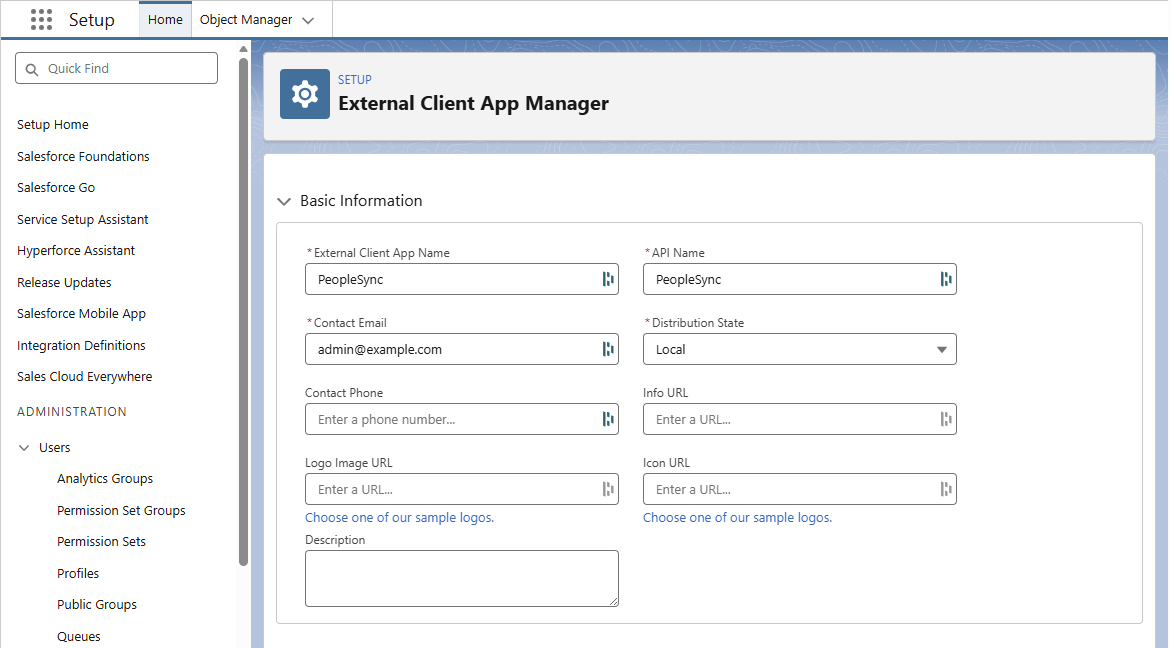
In Salesforce Setup, go to Apps > External Client Apps > Settings > External Client App Manager.
-
Click New Connected App. In the Basic Information section fill External Client App Name and Contact Email.
-
In the API (Enable OAuth Settings) section click Enable OAuth Settings.
-
Fill in the following OAuth settings:
-
Callback URL: http://localhost:33333
-
Available OAuth Scopes : Perform requests at any time (refreshtoken, offline_access), Manage user data via APIs (api)
-
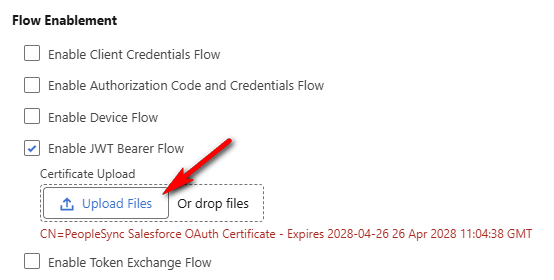
Enable JWT Bearer Flow.
-
Disable Require Proof Key for Code Exchange (PKCE) extension for Supported Authorization Flows
-
Click the Create button at the bottom of the page.
-
Under Settings > OAuth Settings, click the Consumer Key and Secret button. Make a note of the consumer key.
Creating a Salesforce Certificate
After you have created the OAuth Application in Salesforce, you can create the corresponding Salesforce Certificate in PeopleSync.
-
In PeopleSync Console, navigate to Agents > Action Accounts.
-
Click on the arrow next to the New icon and select Salesforce Certificate.
-
Enter the consumer key from your Salesforce OAuth application.
-
Enter the salesforce username that is being impersonated.
-
Click on the Download Public Key PEM) icon to download the certificate’s public key
-
Now go back to your Salesforce OAuth application.
-
In the Settings tab, click on Edit.
-
Below Enable JWT Bearer Flow, upload the Certificate from PeopleSync.
-
Save the OAuth Application.