
The Salesforce Agent imports contacts from the contacts list in Salesforce. The agent uses a default mapping of list fields to vCard fields, but a custom mapping can also be configured.
The Salesforce Agent configuration example shows a sample configuration of the Salesforce agent. The agent will connect to Salesforce and fetch all contacts available to the configured service account.
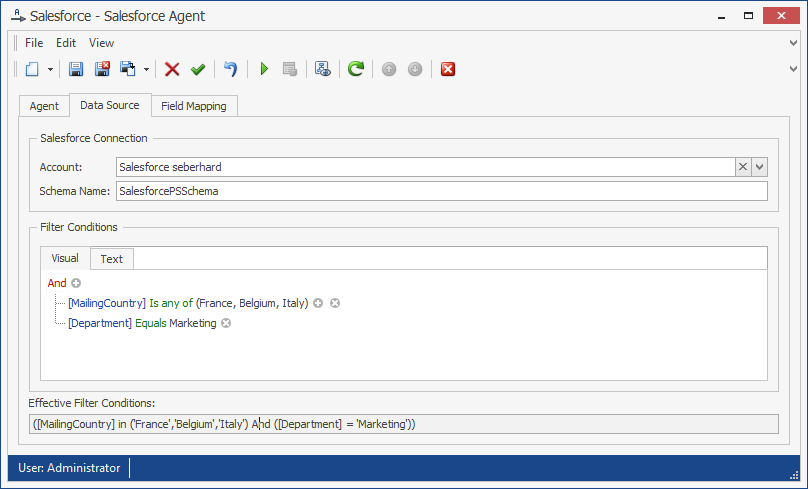
Note: The Schema Name “SalesforcePSSchema” should not be changed. If you need a custom schema, please contact messageconcept support.
Requirements
API access must be enabled for the organization. As described in Salesforce knowledge article 000005140, the organization must be on one of the following editions:
-
Enterprise Edition
-
Unlimited Edition
-
Developer Edition
-
Performance Edition
Configuration
The Salesforce Agent uses the following configuration parameters:
Service Account: An account that has the right to view the organization’s contacts. Please add the Salesforce user’s security token at the end of the password when saving the Salesforce Service Account in PeopleSync. For example, if the Password is Password1 and the security token is XXXXXXXXXX, the Service Account’s password must be saved as Password1XXXXXXXXXX.
OAuth can also be used for authentication. Please see 6.2.4 Salesforce Certificate for information on how to configure OAuth with the JWT Bearer Flow.
Filter Conditions: A list of filter conditions. Blank, if no conditions are specified. The following operators may be used:
-
And
-
Or
-
Equals / Does not equal
-
Is less than / Is less than or equal to
-
Is greater than / Is greater than or equal to
-
Contains / Not Contains (Use Wildcard Operator ‘%’)
-
IN / NOT IN
Field Mapping
Field Mapping (Tab): In the Field Mapping tab, a custom mapping of SharePoint list fields to vCard fields can be specified. The field mapping shows the names of the vCard fields as field names. The corresponding name of the Salesforce field must be entered into the text box next to the field. For example, to map the Salesforce field “Description” to the “Notes” field in the vCard, it needs to be entered into the text box next to the “Notes” caption.
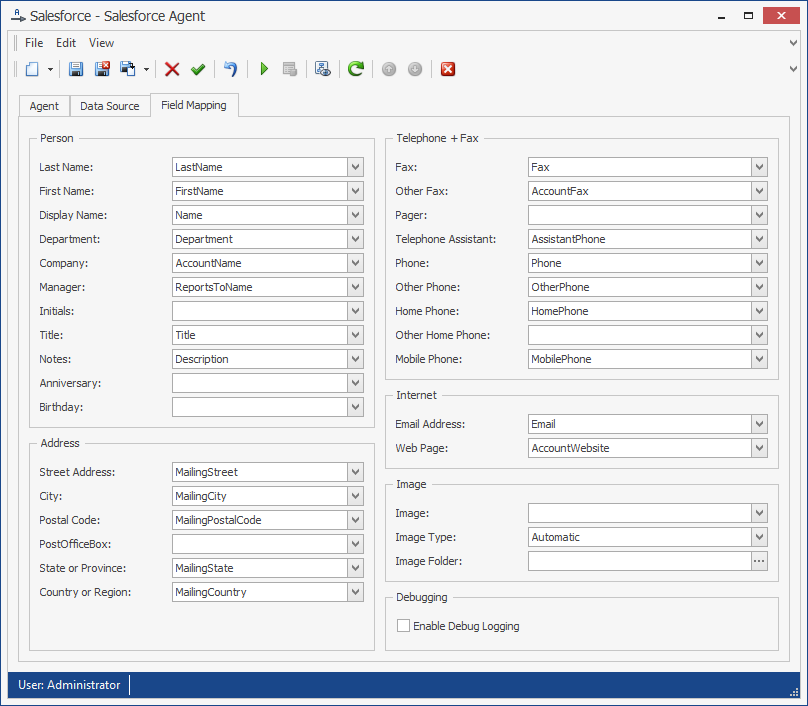
In the field mapping, the following special parameters can be configured:
Image: The source field for the image data
Image Type: The image’s type. One of the following:
-
Automatic: The Agent automatically determines the type of the field.
-
File Name: The source field contains a file name. If it is a relative path, the Image Folder parameter must be set to the base directory.
-
Binary Data: The source field contains binary data.
-
Base64 Data: The source field contains base64-encoded data.
Image Folder: The image file’s base directory. When importing images of type File Name and the attribute value is a relative path, this must be set to the image’s base directory.
Debugging: Enables debug logging to a file in the service account’s temp folder. Enable only if requested by messageconcept support.
Phone Number Mapping
Phone number mapping is supported by this agent. See chapter Phone Number Mapping for details.
Verify the configuration
After completing the configuration:
-
Confirm that the Salesforce action account or certificate can authenticate.
-
Run the agent against a test or controlled address list.
-
Review the agent log for authentication, API, permission, and mapping errors.
-
Compare several imported contacts with Salesforce.
Expected result: The agent authenticates to Salesforce and imports the expected contacts.