
On mobile devices, contact phone numbers are mapped to specific vCard phone fields. This default mapping is not always satisfactory, as for example a second phone number (other Phone) will be shown as “Voice” on the devices.
Most agents allow you to customize this mapping, provided that the associated address book is not configured with Published LDAP.
Agents that support custom phone number mapping include a Phone Mapping tab. In this tab, you can assign source phone attributes to different vCard fields. For example, both Phone and Other Phone can be mapped to the vCard Phone field.
If multiple attributes are mapped to the same vCard field, the number from the Phone attribute is displayed first. Additional numbers mapped to that field are displayed afterwards.
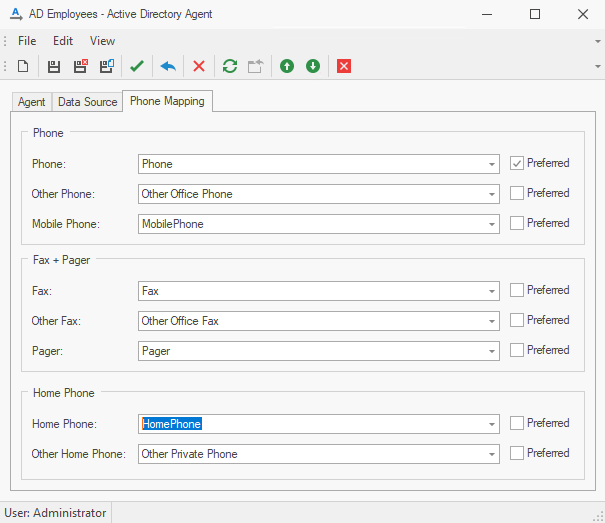
The above figure shows the default mapping. For greater ease of use, we suggest to also map “Other Phone” to “Phone”, “Other Fax” to “Fax” and “Other Home Phone” to “Home Phone”.
Custom Labels
You can define custom labels, such as “Office Phone”, by entering the desired label in the drop-down field next to the phone number type.
On the mobile device, the custom label is displayed instead of the default CardDAV phone number type.
Preferred Phone Number (Android Only)
For Android devices, you can designate a phone number as the preferred number by selecting Preferred for a specific phone number type.
When a user taps the contact's call icon, Android will use the preferred number for the call.
If multiple numbers are mapped to one phone type, only one number will be marked as preferred.
The preferred phone setting is only evaluated on Android devices. Other platforms ignore the preferred phone flag and do not use it when initiating calls.