
The LDAP Agent imports contact data from LDAP directories. LDAP fields can be mapped freely to vCard fields. Importing an image field, such as the thumbnailPhoto attribute is also possible.
The agent retrieves all contacts or users found in the subtree of a base DN (i.e. an organizational unit or the domain root) that match the criteria defined by a filter condition. To connect to the directory, an account with read permission is needed.
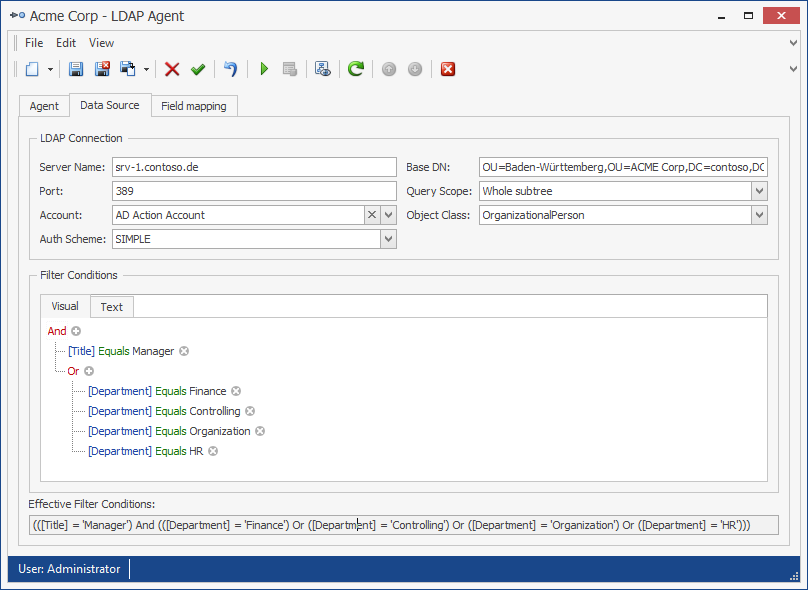
The LDAP Agent configuration example shows an LDAP Agent that imports all "OrganizationalPerson" objects in and below the "Baden-Württemberg" organizational unit. It imports all users and contacts with the title “Manager” from the departments of Finance, Controlling, Organization and HR. It uses an account named "AD Action Account" to access the directory.
Requirements
The following requirements must be met by the source system:
-
LDAP v2 or LDAP v3 Protocol
Configuration
The LDAP Agent uses the following configuration parameters:
Server Name: The DNS name or IP address of an LDAP server.
Port: The LDAP server’s port. Default is 389.
Base DN: The distinguished name of a base container or organizational unit. Matching objects will be retrieved from this container and all child containers. For example, the organizational unit "Marketing" located directly below the root of the domain "ps.local" needs to be specified as "ou=Marketing,dc=ps,dc=local".
Distinguished names can be copied from the "attribute editor" tab in Active Directory Users and Computers. This tab only shows when "Advanced Features" is enabled in the "View" menu.
Account: An account that is used to read data from Active Directory and has at least read permission in Active Directory.
Auth Scheme: Mechanism to be used for authenticating with the LDAP server.
-
SIMPLE: Plaintext authentication (Default)
-
DIGESTMD5: Digest-MD5 authentication
-
NEGOTIATE: NTLM/Negotiate authentication
Query Scope: Defines the depth of the search.
-
Whole Subtree: BaseDN and All objects on all levels below the BaseDN.
-
Single Level: BaseDN and all direct descendants.
-
Base Object: Only the BaseDN
Object Class: The type of object to be queried. Typical object classes include:
-
User: A user
-
Contact: A contact
-
OrganizationalPerson: Superclass of User and Contact, excludes some mail and security attributes from the SecurityPrincipal and MailRecipient auxiliary classes.
-
Group: A group
Filter Conditions: A list of filter conditions. Blank, if no conditions are specified. For the LDAP Agent, the following operators may be used:
-
And
-
Or
-
Equals
-
Does not equal
-
Is less than / Is less than or equal to
-
Is greater than / Is greater than or equal to
-
Contains (Use Wildcard Operator ‘%’)
Object Filter: An LDAP object filter can be used instead of the SQL-Style filter. Do use an object filter, in filter conditions, switch to text mode and then enter the object filter using the following syntax: Filter = '<objectFilter>'.
Example: Filter = '(&(telephoneNumber=*)(objectCategory=Person))'
Field Mapping
All LDAP fields may be freely mapped to contact fields. A default mapping is provided for the OrganizationalPerson object class, which can also be used for the User and Contact object classes.
Note: When importing binary-encoded images from LDAP fields, i.e. the ThumbnailPhoto attribute, the image type field must be set to Automatic or Base64 data.
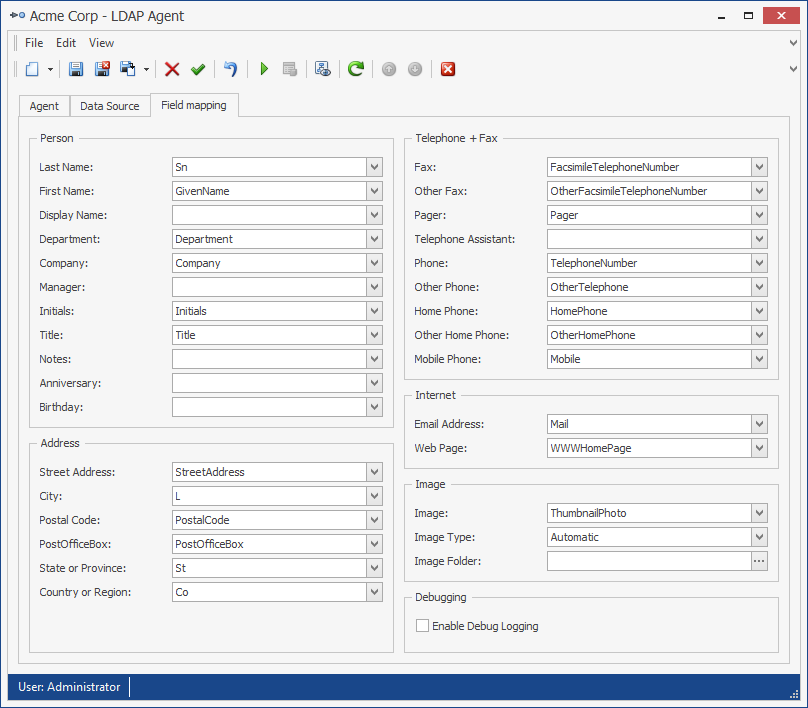
The field mapping shows the names of the vCard fields as field names. The corresponding name of the source field must be entered into the text box next to the vCard field.
In the field mapping, the following special parameters can be configured:
Image: The source field for the image data
Image Type: The image’s type. One of the following:
-
Automatic: The Agent automatically determines the type of the field.
-
File Name: The source field contains a file name. If it is a relative path, the Image Folder parameter must be set to the base directory.
-
Binary Data: The source field contains binary data.
-
Base64 Data: The source field contains base64-encoded data. This must be set when importing data from the ThumbnailPhoto attribute.
Image Folder: The image file’s base directory. When importing images of type File Name and the attribute value is a relative path, this must be set to the image’s base directory.
Debugging: Enables debug logging to a file in the service account’s temp folder. Enable only if requested by messageconcept support.
Phone Number Mapping
Phone number mapping is supported by this agent. See chapter Phone Number Mapping for details.
Verify the configuration
After completing the configuration:
-
Validate the LDAP host, port, encryption, base DN, bind account, and object filter.
-
Run the agent against a test or controlled address list.
-
Review the agent log for bind, search, filter, and mapping errors.
-
Compare several imported directory objects with the LDAP source.
Expected result: The LDAP search succeeds and only matching objects are imported.