
All Agents share a set of generic properties to control and schedule each Agent.
Agent Control
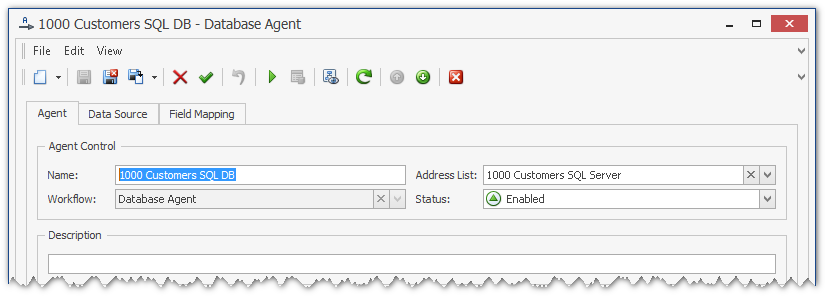
All Agents have the following four properties for agent control:
-
The Name of an Agent describes the purpose of the agent.
-
You need to select an existing Address List for each Agent. The Address List will be used to store the contact data, retrieved by the Agent.
-
You can select a Workflow for the Agent. In most cases, only one workflow will be available.
-
The Status of each Agent can be set to Enabled or Disabled. Only enabled Agents will retrieve data according to the schedule.
Sync Schedules
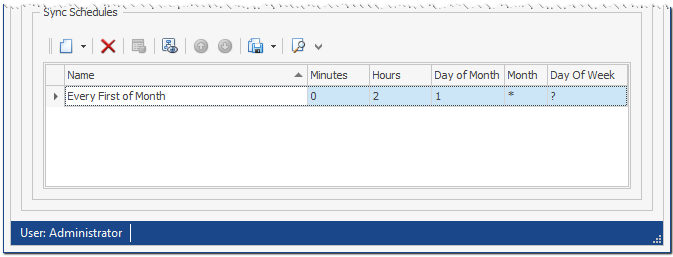
You can configure one or more individual Sync Schedules for each Agent. A Sync Schedule in PeopleSync uses CRON-style syntax:
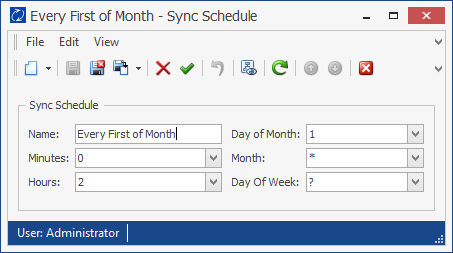
Each Sync Schedule has a unique Name for documentation purposes.
The Sync Schedule must be defined using the following CRON expressions:
|
Field name |
Allowed Values |
Allowed Special Characters |
|---|---|---|
|
Minutes |
0–59 |
, |
|
Hours |
0–23 |
, * |
|
Month |
1–12 |
, * |
|
Day of Month |
1–31 |
, * ? |
|
Day of Week |
0–6 |
, * ? |
The following special characters are used as values:
|
Character |
Description |
|---|---|
|
, |
Commas are used to separate items of a list. For example, using 8,12,16 in the field hour means hours 8, 12 and 16 of a day. |
|
* |
The asterisk indicates that the expression matches for all values of the field. E.g., using an asterisk in the field month indicates every month. |
|
? |
The question mark is used instead of * for leaving either day-of-month or day-of-week blank. |
CRON expressions beyond the tables above are not supported.