
Part of Database Agent
Custom database providers can be defined in the Database Providers section. They can be used to create a connection with a database provider that is not officially supported or to accommodate for a special connection string.
A custom database provider consists of a Display Name, Provider Factory Type Name, Provider Assembly Full Path and a Connection String Template.
PeopleSync uses .net 7.0+ compatible database drivers that implement System.Data.Common.DbProviderFactory.
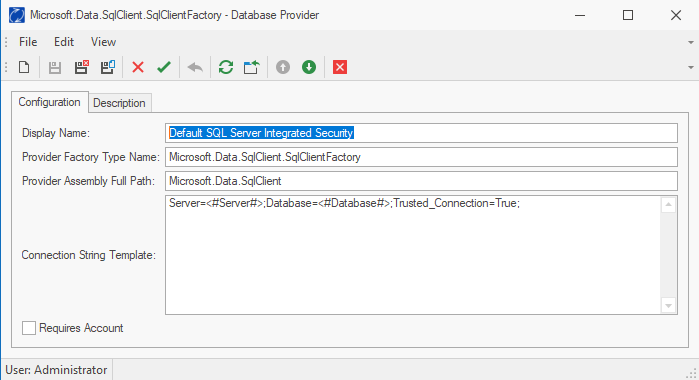
Provider Factory Type Name: The class name, including namespace, of the DbProviderFactory, e.g. ”Microsoft.Data.SqlClient.SqlClientFactory”.
Provider Assembly Full Path: The name or full path of the assembly containing the DBProviderFactory, e.g. “Microsoft.Data.SqlClient”.
Connection String Template: The connection string template contains a connection string with placeholders that will be filled when the template is used in an agent. The following placeholders may be used in a connection template:
-
#Server# The DNS name or IP address of the database server.
-
#Database# The database name
-
#User# The username required to connect to the database
-
#Password# The password required to connect to the database.
An example of a connection string template can be seen in Figure 35: Custom Database Provider.
Requires Account: This setting should be checked if the #User# and #Password# placeholders have been used in the connection string. This activates a validity check during agent configuration and prevents users from inadvertently forgetting to configure an action account. Do not check if the connection string template uses integrated authentication – i.e., authenticates with the credentials of the PeopleSync Service.