
Part of Database Agent
All Database fields may be freely mapped to contact fields.
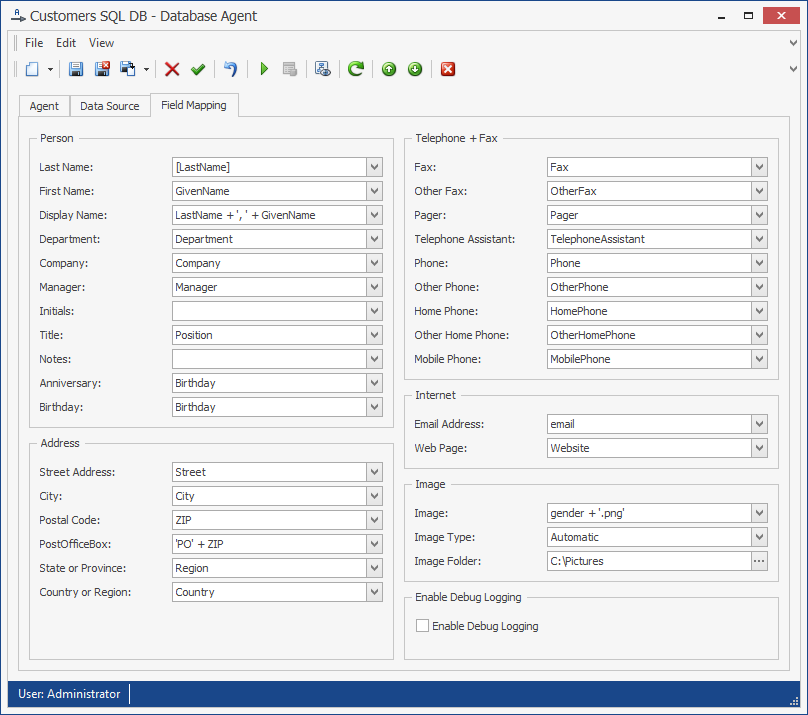
The field mapping shows the names of the vCard fields as field names. The corresponding name of the source field must be entered into the text box next to the vCard field.
In the field mapping, the following special parameters can be configured:
Image: The source field for the image data
Image Type: The image’s type. One of the following:
-
Automatic: The Agent automatically determines the type of the field.
-
File Name: The source field contains a file name. If it is a relative path, the Image Folder parameter must be set to the base directory.
-
Binary Data: The source field contains binary data.
-
Base64 Data: The source field contains base64-encoded data.
Image Folder: The image file’s base directory. When importing images of type File Name and the attribute value is a relative path, this must be set to the image’s base directory.
Debugging: Enables debug logging to a file in the service account’s temp folder. Enable only if requested by messageconcept support.