
Part of Database Agent
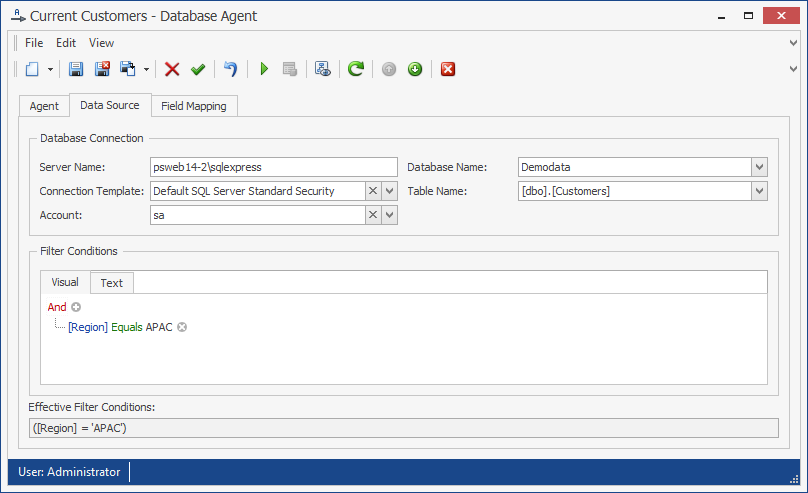
The Database Agent configuration example shows a sample Database Agent configuration. Here, contacts are loaded from the table "[HumanResources].[vJobCandidate]" located in the SQL Server Database "AdventureWorks2012". The connection string template "Default SQL Server Integrated Authentication" is being used, which means that no action account needs to be entered, as the account running the People Sync service is used to connect to the database. In this case, all rows of the "vJobCandidate" Table are loaded, as no filter has been defined.
The Database Agent uses the following configuration parameters:
Connection Template: Select an appropriate connection template for the type of connection being configured. The template contains a connection string and corresponding database provider. PeopleSync includes several predefined templates. To define another template, see Custom Database Providers.
Server Name: The server’s DNS name or IP address. In case of SQL Server, if an instance other than the default instance is being used, the server name needs to be specified as {Server Name}\{Instance Name}.
Account: The account used to log on to the database, if credentials other than those of the account running the PeopleSync Service are needed.
Database Name: The name of the database.
Table Name: The name of the table or view.
Filter Conditions: A list of filter conditions. Blank, if no conditions are specified.
Verify the configuration
After completing the configuration:
-
Test the database connection with the configured provider, connection template, and action account.
-
Run the agent against a test or controlled address list.
-
Review the log for provider-loading, connection, SQL, filter, and mapping errors.
-
Compare the imported row count and sample field values with the source query.
Expected result: The source query executes successfully and only the intended rows are imported.