
Part of Exchange Folder Agent
The agent connects to Exchange Online through Microsoft Graph or Exchange Web Services (EWS), as selected in Exchange API. Microsoft Graph is the recommended API for user and shared mailbox contact folders. EWS is required for on-premises Exchange and, while Microsoft still permits EWS in Exchange Online, for Exchange Online public folders.
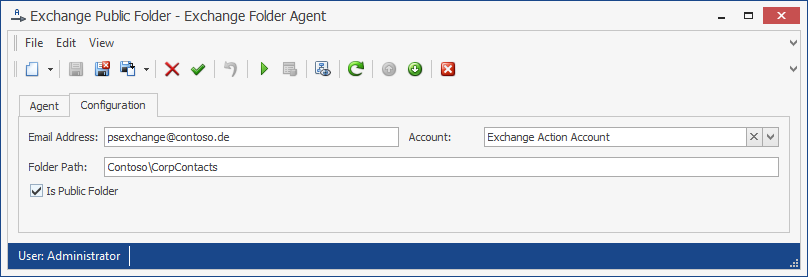
Figure 29 shows a legacy EWS public-folder configuration. The email address “exchangeAction@messageconcept.com” is used to automatically determine the Exchange Server to connect to.
The action account named “Exchange Folder Action Account” is being used. For EWS Basic Authentication, the action account username is the Windows login name—more specifically, the user principal name—associated with the mailbox, for example “exchangeAction@messageconcept.com”. Microsoft Graph requires an Entra ID App or Entra ID App Certificate action account instead.
All contacts found in the public folder “Customers\TierA” are loaded into a PeopleSync address list. The checked Is Public Folder option signals that the folder is in the public-folder hierarchy and not the user’s mailbox.
When using an on-premises Exchange Server, configure the agent as follows:
Email Address: The email address of an Exchange mailbox. This address is used to configure the Exchange Server connection automatically through Exchange Autodiscover. The folder specified in Folder Path must be in this mailbox when Is Public Folder is not selected.
Folder Path: The path to a contacts folder inside a mailbox or public-folder hierarchy. It uses Windows directory-style syntax. Separate subfolders with “\”. Examples: Contacts, Sales\Contacts\VIP.
Account: An action account containing credentials for the user who owns the mailbox specified in Email Address, or a user with permission to access that mailbox. The action account must have a mailbox.
Is Public Folder: Select this option when Folder Path refers to a public folder. Clear it when the folder is inside the mailbox specified in Email Address.
Exchange Web Services URL (optional): If Exchange Autodiscover is unavailable, specify the EWS URL manually.
Verify the configuration
After completing the configuration:
-
Confirm that Exchange Autodiscover or the configured EWS endpoint is reachable.
-
Confirm that the action account can access the selected mailbox or public folder.
-
Run the agent and review the log for authentication, folder-path, and permission errors.
-
Compare contacts from the configured Exchange folder with the destination address list.
Expected result: The configured mailbox or public folder is read successfully and its contacts are imported.