
In the System Settings dialog, essential settings for PeopleSync can be configured.
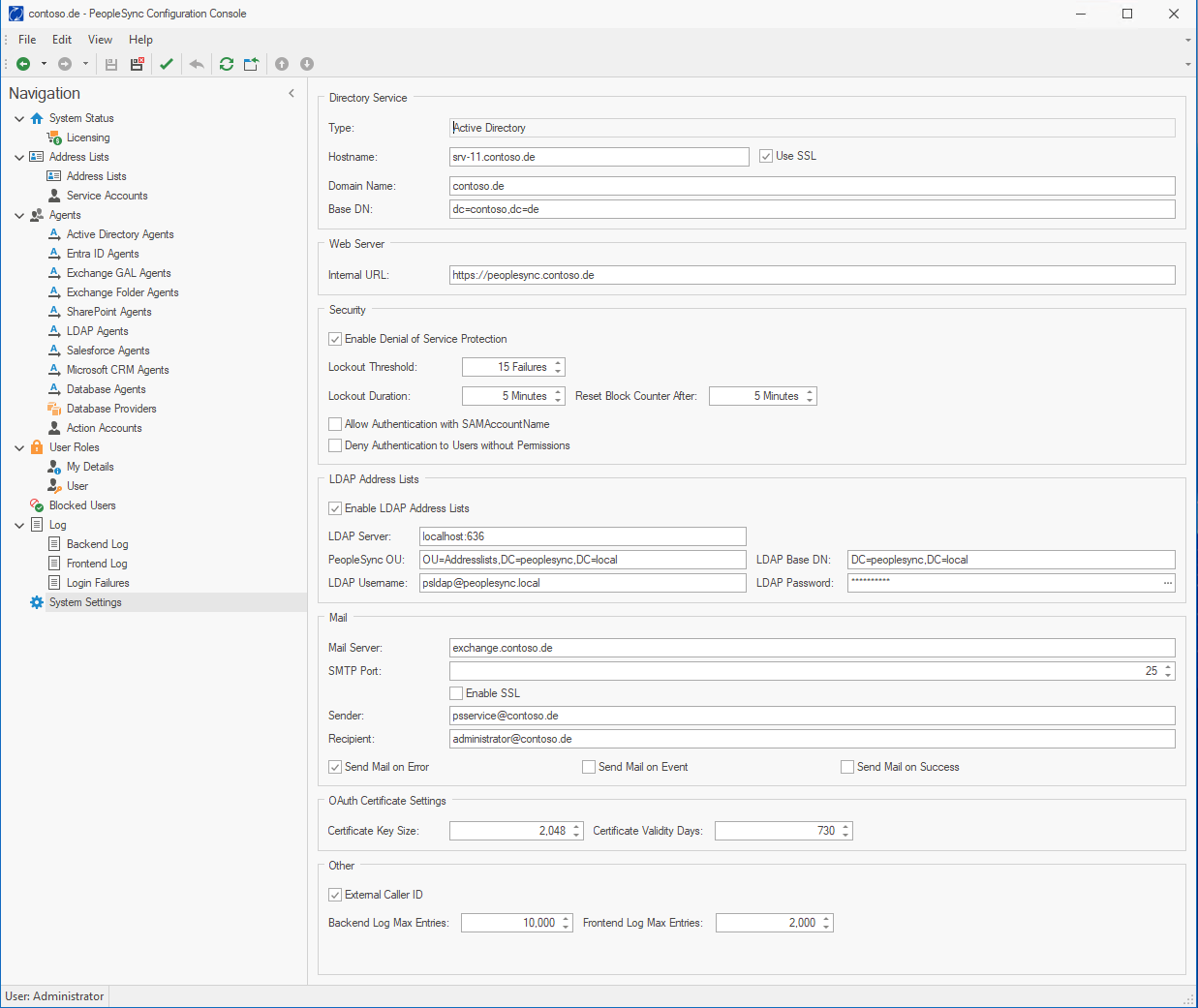
Directory Service
-
Hostname: The IP address or DNS name of an LDAP Server. When using Active Directory, it must be a Global Catalog. Note that the PeopleSync Frontend server will also access this server.
-
Domain Name: The Active Directory Domain's DNS name (e.g. contoso.de). Only needs to be filled when using Active Directory.
-
Base DN: The Active Directory Domain's distinguished Name (e.g. dc=contoso,dc=de). See Appendix 9.1 Determining an AD Domain's Distinguished Name.
Must be empty when using NetIQ eDirectory -
SSL Enabled: If enabled, SSL will be used for all communications between PeopleSync components and LDAP directory service.
Web Server
-
Internal URL: The URL PeopleSync Agent can use to connect to the PeopleSync Frontend Server via the internal network (e.g. https://srv01.contoso.local, http://srv01.contoso.de:88).
Security
-
Enable Denial of Service Protection: Enables denial of service protection. See chapter “5.6 Denial of Service Protection”.
-
Lockout Duration: The duration in minutes a user is locked out when denial of service protection is enabled.
-
Allow Authentication with SAMAccountName: Allow users to logon from mobile devices with only their sAMAccountName. Option exists for compatibility reasons. For security reasons, keep disabled.
-
Deny Authentication to Users without Permissions: When this option is enabled, the frontend will reject user logins with a 401 HTTP status code even when these users’ credentials are valid, but they have no permission to access a PeopleSync address list. This behavior will make it harder for attackers to guess user passwords via the PeopleSync Frontend as long as an account does not have permission to access an address list.
LDAP Address Lists (Optional)
If you want PeopleSync to publish Address Lists to an LDAP directory, you must configure the following parameters:
-
Enable LDAP Address Lists: Check to enable LDAP functionality.
-
LDAP Server: The LDAP server’s DNS name or IP address
-
LDAP Base DN: The LDAP directory’s base DN.
For the PeopleSync LDAP directory, please set to DC=peoplesync,DC=local. -
LDAP Username: A user with write access to the LDAP directory. This can either be a domain or LDAP user account. If you are using an LDAP account, enter either the distinguished name or – if configured – the user principal name (UPN).
For the PeopleSync LDAP directory, please set to psLDAP@peoplesync.local. -
LDAP Password: The LDAP user’s password. Please note that except for the PeopleSync LDAP directory, password policies may apply, and the user’s password may expire at some time. Please make sure that the account’s password will not expire (AD LDS attribute: msDSUserDontExpirePassword).
For the PeopleSync LDAP directory, please use LDAP admin user password you set during installation of the PeopleSync LDAP directory. -
PeopleSync OU: The organizational unit where PeopleSync will create LDAP address lists and contacts. For the PeopleSync LDAP directory, please use OU=Addresslists,DC=peoplesync,DC=local.
Mail
-
Mail Server: The DNS name or IP address of an SMTP server.
-
SMTP Port: The SMTP server's TCP Port (e.g., 25).
-
Send Mail on Error: Send mail only when an error occurs (recommended)
-
Send Mail on Event: Send an email for every event logged to the PeopleSync database (only for debugging).
-
Send Mail on Success: Send an email every time an agent successfully runs.
OAuth Certificate Settings
-
Certificate Key Size: Specifies the length of the cryptographic key used for the certificate, typically in bits (e.g., 2048 or 4096). A larger key size increases security but may require more computational resources.
-
Certificate Validity Days: Determines how long the certificate is valid before it expires. Setting an appropriate validity period helps maintain security by ensuring certificates are renewed regularly.
Other Settings
-
Enable external caller ID: Enables “Default Country Code” setting on address lists. This lets the user set a default country for the formatting of all phone numbers where a country cannot be deduced from address or phone data.
-
Backend Log Size: Configure the number of events to be kept in the Backend Log.
-
Frontend Log Size: Configure the number of events to be kept in the Frontend Log.