
The PeopleSync Configuration consists of different objects, such as Address Lists, Agents and User Accounts. All object types are managed in a similar way. Therefore, we describe the management of objects on a general basis in this chapter.
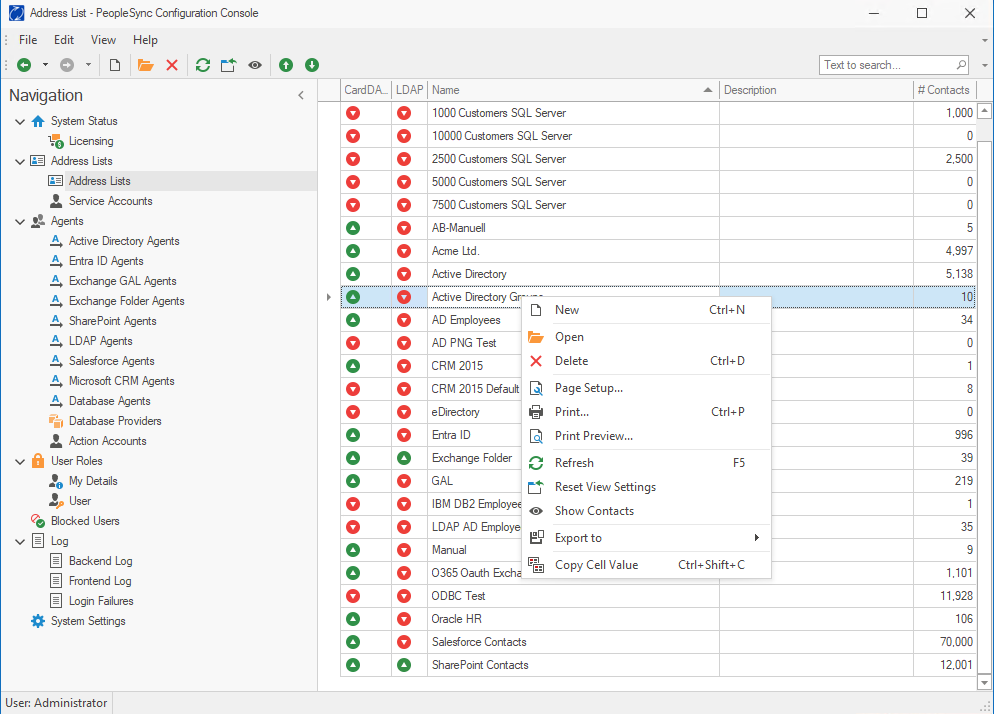
All object management functions can be found in the menu, the symbol bar and the context menu. The console also offers shortcut keys for most functions.
Creation of new Objects
To create a new object (e.g. Address List) in the PeopleSync console, navigate to the corresponding menu item in the navigation bar. Use the File New command in the menu, the New symbol in the icon bar, the New command in the context menu or the keystroke CTRL+N.
Deletion of an Object
To delete an object in the PeopleSync console, highlight the object in the list. Use the File Delete command in the menu, the Delete symbol in the icon bar, the Delete command in the context menu or the keystroke CTRL+D.
Documentation of your Configuration
You can print an object for documentation purposes. To print an object in the PeopleSync console, highlight the object in the list. Use the File Print command in the menu, the Print command in the context menu or the keystroke CTRL+P. You can change the Page Setup or to get a Print Preview in the menu and the context menu.
If you would like to export object information for documentation purpose on a file base, you are also able to use the Export to function in the menu or context menu.