
The following system requirements apply for the PeopleSync components. We distinguish between the different PeopleSync server roles and the console:
|
Requirements |
Roles |
Service |
Frontend |
Database |
Console |
|---|---|---|---|---|---|
|
x64 CPU Architecture |
X |
X |
X |
X |
|
|
System Memory (RAM) |
8 GB |
4 GB |
|||
|
Free Hard Disk Space |
10 GB * |
||||
|
Microsoft Windows Server 2016 and higher |
X |
X |
X |
X |
|
|
Microsoft Active Directory Lightweight Directory Services |
|
|
|
|
|
|
Microsoft SQL Server 2014 or higher |
|
|
X |
|
|
|
Windows Management Framework 3.0 |
X |
|
|
|
|
Note: It is possible to install all roles on a single server or on dedicated systems. All-in-one systems need to fulfill all requirements of the different roles.
User Directory
When users access address lists from their devices, they need to authenticate at the PeopleSync Frontend Server. PeopleSync contains no user directory, but instead relies on existing enterprise LDAP directories.
Currently, the following user directories are supported:
-
Microsoft Active Directory
-
Microsoft Active Directory Lightweight Directory Services (AD LDS)
-
NetIQ eDirectory
When using Active Directory as a user directory, nested group memberships are evaluated by PeopleSync.
Special Requirements for NetIQ eDirectory
PeopleSync uses the following attributes and object classes in NetIQ eDirectory:
User object:
-
objectClass: inetOrgPerson
-
attribute for user name: uid
-
group membership: groupMembership
The attribute groupMembership is used by PeopleSync to calculate rights to address books. If a group membership is not listed here, PeopleSync cannot know about it. In PeopleSync, eDirectory users authenticate with their uid.
Group object:
-
objectClass: groupOfNames
-
RDN: cn
In eDirectory, only direct group membership will be evaluated. It is not possible to use nested groups.
Special Requirements for AD LDS
PeopleSync uses the following attributes and object classes in AD LDS:
User object:
-
objectClass: user
-
attribute for user name: userprincipalName
-
group membership: memberOf
The attribute memberOf is used by PeopleSync to calculate rights to address books. If a group membership is not listed here, PeopleSync cannot know about it. In PeopleSync, AD LDS users authenticate with their userPrincipalName.
Group object:
-
objectClass: group
-
RDN: cn
In AD LDS, only direct group membership will be evaluated. It is not possible to use nested groups.
PeopleSync Service
Hardware
We recommend the following minimum hardware:
-
x64 CPU architecture
-
8 GB RAM
-
10 GB free hard disk space
The requirements for the Microsoft software products apply for PeopleSync also. Depending on the number of address book entries and clients, extended hardware requirements might apply.
Microsoft Software
The following Microsoft software components are required:
-
Microsoft Windows Server 2016 and higher
-
Windows Management Framework 3.0[1]
PeopleSync Frontend Server
Hardware
We recommend the following minimum hardware:
-
x64 CPU architecture
-
8 GB RAM
-
10 GB free hard disk space
The requirements for the Microsoft software products apply for PeopleSync also. Depending on the number of address book entries and clients, extended hardware requirements might apply.
Note: To scale to many clients, it is possible to implement several load balanced PeopleSync Frontend Servers.
Network requirements
The Frontend Server needs access to the PeopleSync Database and an LDAP Server. If port restrictions are in place, the following ports need to be opened:
-
LDAP Server (Depending on directory type):
o Active Directory: 389 TCP, 636 TCP, 3268 TCP
o AD LDS: 389 TCP, 636 TCP
o eDirectory: 389 TCP, 636 TCP
-
Microsoft SQL Server: Port 1433 TCP[2]
PeopleSync Database
Microsoft SQL Server 2014 or higher is required as a local database instance or on a dedicated database server. SQL Server must be configured for SQL Server Mixed Mode Authentication.
Microsoft SQL Server hardware requirements apply for this system. Depending on the number of address book entries and clients, extended hardware requirements might apply.
Note: All SQL Server Editions (Express, Standard, Enterprise…) are supported.
PeopleSync Console
Hardware
We recommend the following minimum hardware:
-
x64 CPU architecture
-
8 GB RAM
-
10 GB free hard disk space
The requirements for the Microsoft software products also apply to PeopleSync.
Microsoft Software
The following Microsoft software and components are required:
-
Windows Server 2016 and higher
PeopleSync Clients
PeopleSync uses the open standards CardDAV and LDAP on the client side. Therefore, PeopleSync works with all CardDAV and LDAP clients in the market.
-
CardDAV Clients
The PeopleSync Frontend Server provides vCards via the CardDAV protocol in Microsoft IIS. The protocol is supported on all major mobile device platforms. Apple iOS, BlackBerry OS10 and Windows Phone come with native support for CardDAV.
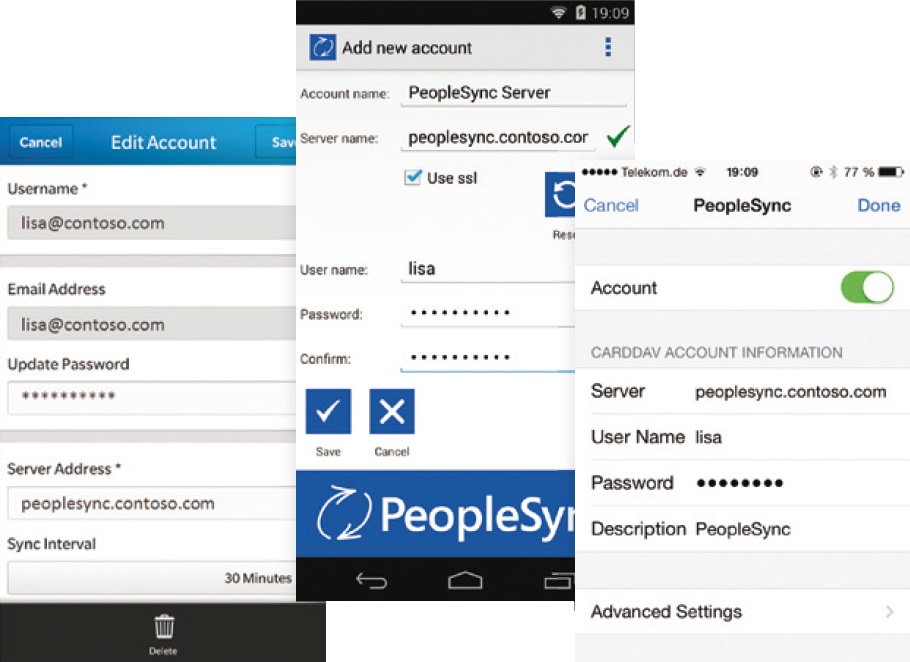
messageconcept provides a free CardDAV App for Android smartphones and tablets in the Google PlayStore and the Amazon Appstore. The app comes with AutoDiscover of the PeopleSync server settings via DNS.
-
PeopleSync-Clients
Beyond mobile devices, PeopleSync works with other CardDAV clients such as Apple’s Address Book application on Mac OS X. Many email applications such as Microsoft Outlook or Mozilla Thunderbird support PeopleSync natively or via CardDAV plugins.
The PeopleSync Frontend Server uses Microsoft AD LDS to provide directory services for LDAP clients. In contrast to CardDAV, the LDAP protocol supports no synchronization, but online access. The protocol is natively supported on most mobile platforms and in almost all email clients.
Beyond computers and mobile devices, LDAP is supported by most desktop phones and telephone systems. This allows caller ID resolution on every office phone.
It is even possible to combine CardDAV and LDAP on a single device to synchronize via CardDAV a data subset, e.g., customer addresses of a dedicated sales district, and access other data via an LDAP online query. If you need to synchronize with further platforms, contact our support team to find a solution for your clients.
Please find more details on supported clients and devices in the PeopleSync Client Configuration Guide.