
PeopleSync consists of several components which work together to provide contact data to mobile devices. In this chapter, an overview will be given about how these components work together in PeopleSync.
Architecture
PeopleSync consists of several components which work together to provide contact data to devices and applications. In this section, an overview will be given about how these components work together in PeopleSync.
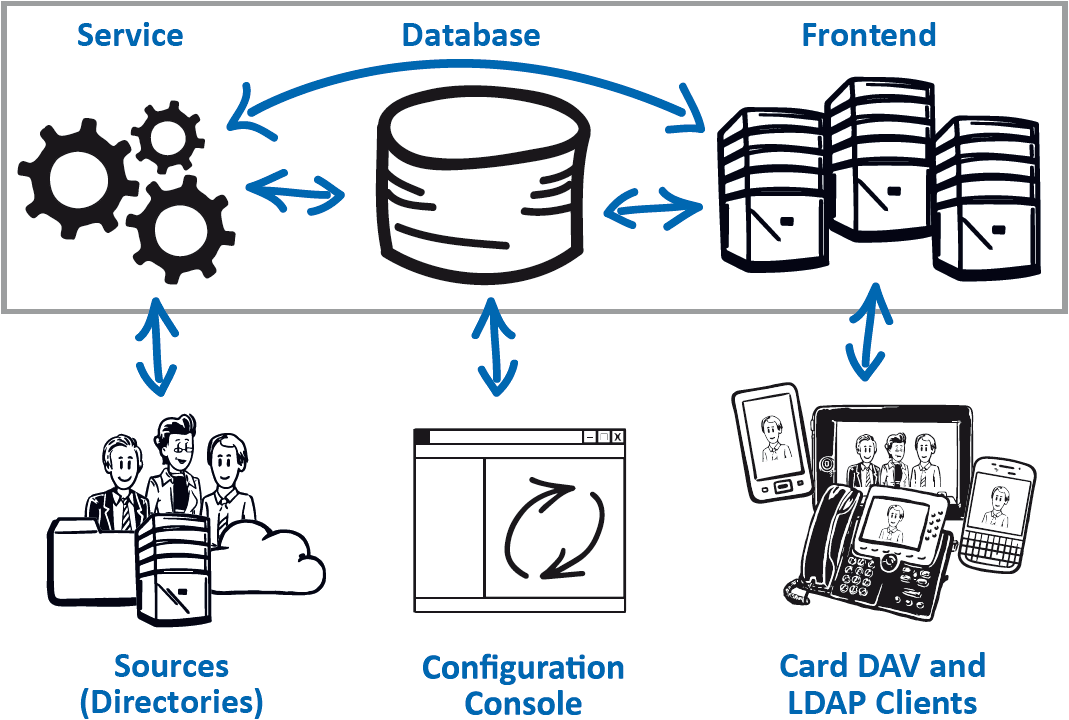
Viewed from the client perspective, the devices and applications connect to the PeopleSync Frontend Server. The Frontend Server is a combination of two components. The CardDAV server runs on top of the Microsoft Internet Information Services (IIS). The LDAP service is based on Microsoft Active Directory Lightweight Directory Services (AD LDS).
The Frontend Server connects to an LDAP directory service to authenticate the user. The user’s group memberships are used to determine which address list the user has access to. Address lists and their content are parallel stored in the PeopleSync Database in Microsoft SQL Server and in the LDAP directory. Devices and applications connect to PeopleSync via the standard protocols CardDAV and LDAP.
The PeopleSync Service executes PeopleSync Agents, which extract contact data from various source systems, e.g., Active Directory, Exchange, or SharePoint, and imports these contacts into corresponding address lists.
All Agents are unidirectional – i.e., they mirror contacts from a source system, but do not write back changes made in PeopleSync. Therefore, address lists serviced by PeopleSync Agent should be read-only for users.
Finally, the PeopleSync Console is used to configure address lists, permissions, and data import.
Software Components
PeopleSync comes with a modular and scalable design. The following software modules can be installed altogether on one machine or on dedicated machines.
Server Components
The PeopleSync Service is the core component of PeopleSync. The service executes all workflows including license checks, address list synchronization agents and database content management.
The PeopleSync Frontend Server is the single point of connection for the clients. The server provides the address lists for client-side synchronization via CardDAV with the database. It is supported to add several web servers for scalability and availability reasons in PeopleSync Enterprise Edition.
The PeopleSync Database stores the address lists and all configuration information in Microsoft SQL Server.
Administrative Components
The PeopleSync Console is the administrative GUI for PeopleSync. The console stores the configuration in the database.
Configuration Objects
In this chapter, an overview about the different configuration objects in PeopleSync is given.
Address Lists and Service Accounts
A PeopleSync Address List is a collection of contact items that are stored in the PeopleSync database. Agents store their data in address lists. Clients synchronize address lists – e.g., to a phone’s local address book. The access to an address list is controlled by an access control list, which uses groups from an enterprise directory service.
A PeopleSync Service Account is an account with permissions to write to an address list. It is for use by an agent.
Address lists should be modified either by a single agent job or by a client. To modify contact data in a shared PeopleSync address list on PeopleSync clients, assign Modify permissions to a user or group in the access control list.
Agents
A PeopleSync Agent is a software interface for a specific data source. Agents synchronize contact items from a data source to a PeopleSync address list. The following agents come with PeopleSync:
-
The Active Directory Agent imports contact data including thumbnail photos from Active Directory user and contacts to PeopleSync. An LDAP-filter selects and filters the synchronized data. This agent can be used to retrieve the GAL for Exchange on premise installations.
-
The Exchange GAL Agent imports users and contacts from the Microsoft Exchange Server global address list to PeopleSync. A filter can be set to include only selected objects. This agent is primarily used for Office 365 Exchange Online GALs.
-
The Exchange Folder Agent imports contacts located in a contacts folder in an Exchange mailbox or public folder.
-
The SharePoint Agent imports items from SharePoint lists to PeopleSync. Default contact lists and customized lists are supported. The mapping of fields can be customized in the agent configuration.
-
The Database Agent imports contacts from a database table into PeopleSync using a custom field mapping. The agent can also import photos referenced by URL or folder path.
It is possible to create several agent jobs per agent type to synchronize e.g., two different Exchange contact folders to dedicated PeopleSync Address Lists.
Workflows
An agent is defined by a PeopleSync Workflow. The workflow contains a set of tasks that will be executed to import contacts from data sources. Currently, Workflows cannot be customized. The customizing of workflows is expected to be supported in PeopleSync Enterprise Edition in the future.