
If your clients cannot successfully connect to the PeopleSync server or no address books and no contact data is shown on the clients. You can try the following steps to narrow down the problem.
First, switch the PHP Error Reporting to Development machine. For that, go to PHP Managers main view. Under PHP Settings click on Configure error reporting. This will open the following view.
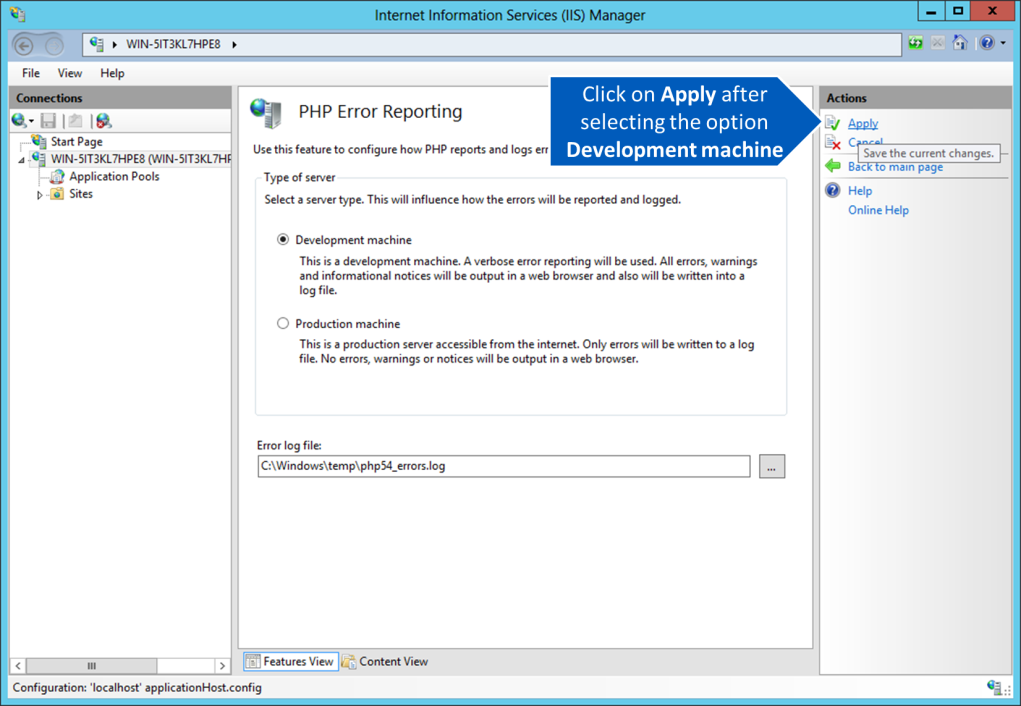
By switching the server type to Development machine, the PHP settings are changed to show errors in the browser instead of logging them to a file. Then open a web browser and enter the URL of your PeopleSync server, such as http://peoplesync.example.com/.
This will prompt you for a user name and password. If this succeeds, you can browse through the address books which have been made available for this given user. If this step fails, an error message from the server will be displayed in the web browser. Typical errors include:
-
database server not reachable
→ check your server.ini -
database not correctly setup
→ use PeopleSync Console to correct this -
failure to authenticate the user
→ check with PeopleSync Console if the configured Active Directory server is correct.
Note: Don’t forget to switch PHP Error Reporting back to Production Machine after solving problems and finishing troubleshooting. Not switching back to Production Machine poses a security risk as passwords can potentially be logged in the PHP error log.