
🤔 Problem
Exchange Folder Agent fails with the following error message:
The Autodiscover service couldn't be located
🌱 Solution
The Exchange folder agent tries to locate Exchange Server automaticall through Autodiscover, just like Outlook does. It uses the email address set in the "Email Address" property to find the Exchange server and tries to authenticate with the account specified in the "Account" property.
This usually fails for the following reasons:
-
Network connectivity issues
-
Name resolution, i.e autodiscover.<yourdomain> cannot be resolved or points to the wrong server
-
Credentials specified in "Account" are invalid or is MFA enabled in Office 365 for the specific account.
-
Invalid Exchange Web Services URL is found by Autodiscover.
Diagnosis
To determine the exact cause, you can run the Tool “TestExFolderAutoDiscovery.exe” in "C:\Program Files\messageconcept\PeopleSync\Support\ExchangeFolder\" on your PeopleSync Backend.
Please run the tool on the PeopleSync Backend:
-
In "Email Address", enter the Email Address you set in the agent property "Email Address".
-
In "User Principal Name", enter the UPN of the account you set in the agent property "Account".
-
In "Password", enter the Password of the account you set in the agent property "Account".
-
Other Properties can be left blank.
-
Start by clicking “Run Autodiscover”.
Example:
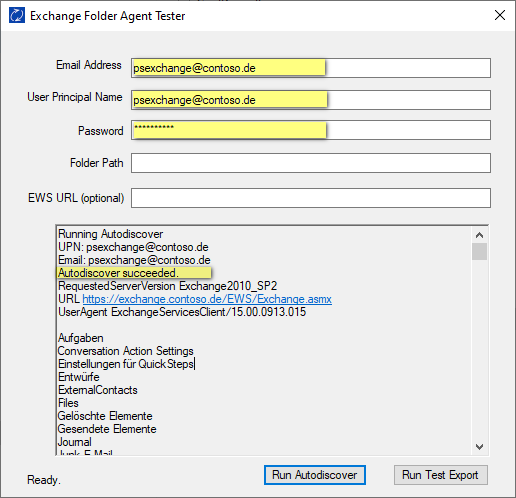
If successful, the output shows “Autodiscover succeeded” along with a list of folders from the target mailbox.
If you are unable to resolve the problem, please send the output text to us.
Manually specifying Exchange Web Services URL
Sometimes, the DNS design in a client’s hybrid Exchange environment prevents autodiscover from succeeding.
In this case, the EWS URL can be manually entered in the Exchange Folder Agent’s field “Exchange Web Services URL”. The URL is as follows:
-
On-premises Exchange: https://<ExchangeServerFQDN>/EWS/Exchange.asmx
-
Office 365: https://outlook.office365.com/EWS/Exchange.asmx